Moo: Giving Your Agents the Runtime Isolation git worktrees Need
git worktree isolates your files. Moo isolates the database, ports, and services, saved per commit. Together, they give your agents fully isolated machines. Learn how to use Moo, the benefits, and why your agents need it.

"Believe it or not, my agents are writing better code with Moo."
Our staff engineer, John Stephens, sent me that message last Friday after his first week using Moo on real tickets.
I'd built it expecting the main feedback to be about parallel agents, fewer collisions, or less wasted time untangling environments. That wasn't his strongest impression.
What he said was that the code coming out of his agents was better.
Not faster. Better.
Here's why:
When an agent is working directly on your machine, it knows your database is real. It's careful. It won't wipe a table to test something. It won't run a destructive migration twice just to see what breaks. It has every reason to play it safe, because the downside lands on you, and it's been trained to be cautious.
Give that same agent its own disposable machine and the calculation changes completely.
It can seed data, drop tables, run migrations forward and backward, do whatever it actually needs to verify the feature is working. The worst case is moo drop and start over, not an afternoon untangling your local environment with multiple agents failing on their tasks in parallel.
Better testing = better code
What John found was that more unrestricted testing led to better implementations and better PRs. The agents caught more issues and more thoughtfully designed the features due to a lack of fear of conflicts.
And the most exciting part? Moo's configuration means you can do this for all your parallel agentic work.
Imagine 8 tasks all running with the same fervor.
That's the idea behind Moo.
As we’ve been building Ito (a tool that runs your code in a sandbox to catch bugs that only show up at runtime), we learned how important running isolated environments is for every branch.
Moo came out of solving that for ourselves.
We're now open-sourcing it, because we know the underlying problem isn't specific to us.
The gap left by worktrees
git worktree gives every branch or agent its own folder. Most software developers coding with AI use this every day to allow multiple agents to build multiple things at the same time.
The problem is that worktrees do nothing for your database, ports, installed packages, nor the background services your app depends on to actually run.
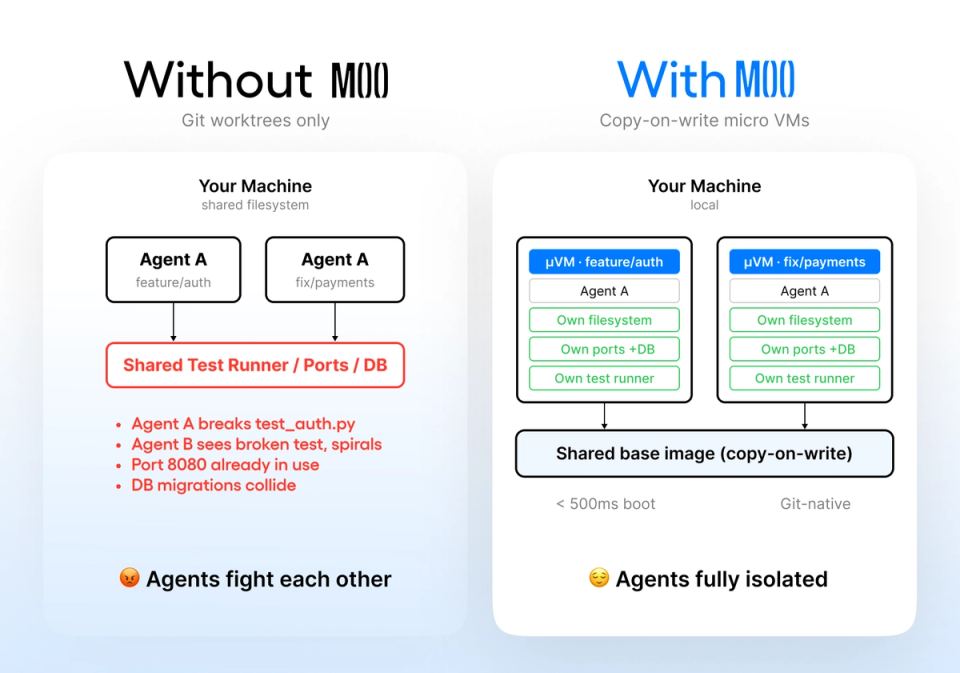
Your agents get separate files, but a shared runtime. They step on each other's database, fight over port 3000, and silently stomp each other's dependencies.
And when you roll back to an old commit to investigate a bug, the database still has today's schema, so the old code doesn't behave the way it did when that commit was current.
Worktrees fix the file half of the problem, but the runtime half stays broken.
How Moo 🐄 helps you
Git versions your files. Moo versions your machine. (Note: The name is inspired by copy-on-write (C-O-W), which makes forking fast. That then lends itself to calling this "moo".)
Moo gives every one of your branches, worktrees, or agent attempts its own hardware-isolated Linux machine: its own database, ports, packages, and services. The machine's state is saved per commit and restored by git checkout.
And best of all, it’s extremely easy to start using.
How to Moo:
Moo is just four commands: new, run, save, drop.
You call it like this:
moo new feat/billing
moo run feat/billing -- npm run migrate
git commit -am "add billing migration"
moo save feat/billing
Each machine is a full Linux VM. It forks in under a second.
Six machines on a 20 GB base image cost megabytes, not gigabytes, because they share storage using copy-on-write.
When the machine's state is saved per commit, git checkout doesn't just rewind your code. It rewinds the database and environment to match:
git checkout HEAD^
moo new feat/billing
The migration is gone. The database matches what the code expected at that commit.
The machine becomes a versioned artifact of your repo, exactly like your code is.
But wait, there's more...
Most people try Moo because of how it helps them run parallel agents. They keep using it for two reasons they didn't expect going in.
1) Time travel.
Rolling back to a specific commit now actually works. The runtime follows the code, so you're not debugging against a database that's three migrations ahead of where your code expects to be.
Say a bug slipped to production last Tuesday. Your customer reports it Wednesday. You've shipped two more migrations since then. You checkout Tuesday's commit, start the app, and the numbers are wrong, but not the same wrong as what your customer saw.
That's because your local database has today's schema, not Tuesday's.
With Moo, all you have to do is:
git checkout abc1234 # last Tuesday's commit
moo new debug/tuesday # boots the exact runtime from that commit
moo run debug/tuesday -- npm start
You're now running exactly what your customer ran.
Same code, same schema, same seed state. The bug reproduces. Now, you can actually fix it.
2) Runtime-aware bisects.
A bug that only shows up after a specific migration runs is normally brutal to track down with git bisect, because bisect rewinds the code, but leaves your database wherever it is today.
With Moo, each step of the bisect boots the runtime that existed at that exact commit:
git bisect start
git bisect bad HEAD
git bisect good v1.2.0
git bisect run bash -c 'moo new probe && moo run probe -- npm test'
Every commit bisect probes, Moo restores the database state that existed at that commit. If the bug lives in migration state, not just code, bisect finds it the same way it would find any other regression.
A bug tied to database state used to mean manually reconstructing an environment at every step. Now, you run git bisect and the runtime follows the code.
Two questions you might be asking...
While we enjoy using Moo, we can understand if there are some skeptics out there. To address the common questions we get about Moo:
1) Why not just spin up a cloud VM per agent, or use devcontainers / Docker Compose?
You can, and a lot of teams do. The difference is that none of those are connected to your git history.
Docker Compose gives you isolated services, but it doesn't know what commit you're on. Rolling back the environment means tearing down and rebuilding, not git checkout.
Moo is local and git-connected.
If you break an environment, you can now reset it the same way you'd reset bad code. No infrastructure to provision or tear down for every agent you spin up.
2) Do I still need git worktree with Moo?
Yes, and this is worth being clear about: Moo and git worktree solve different halves of the same problem.
git worktree isolates files.
Moo isolates the runtime: database, ports, packages, services. You need both.
The full setup is one command each. Add a worktree, give it a machine:
git worktree add ../app-agent-b -b agent/b
moo new agent-b from base
Files isolated by worktree, runtime isolated by Moo.
It’s that easy, and it’s why John's running eight of them at a time now.
Try it for yourself
The repo is at github.com/heyito/moo. Go try it, and tell us what's missing.
Or, you can install it now with:
curl -fsSL https://github.com/heyito/moo/releases/latest/download/install.sh | sh
Note: Moo is alpha software. Right now it only runs on macOS Apple Silicon. Linux is planned.
Related resources.

AI Code Review on GitHub: Automating PR Review Without Writing a Test Suite
Get behavioral feedback on every GitHub pull request before you write a test suite. Learn how to set up runtime PR review and where human judgment still decides the merge.

The Electrification of Factories: What Software Teams Can Learn From the Transition
Factory electrification reshaped production only after owners redesigned the floor. AI software teams need the same shift in workflow, review, and verification.

Bug Catch of the Week: How a Failed Database Swap Could Delete Your Only Copy
DoltLite's replacement flow could delete the old database before the new copy was safe. Here's how runtime testing exposed the failure path before release.
Your first PR tested within 60 minutes.
Connect your repo and Ito starts testing pull requests right away. Each PR includes a full QA report with video, screenshots, and failure details directly in the PR.
no credit card required